 |
Home | VelaClock app | VelaClock widget | VelaTerra | Blog | Company |

|
Introducing a new VelaClock app
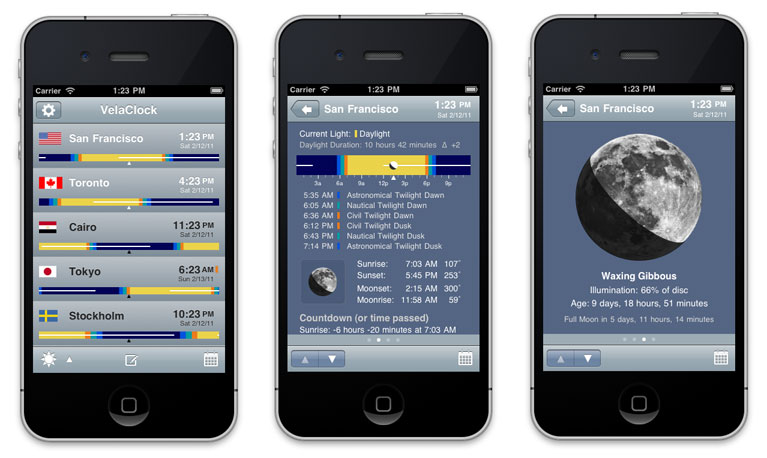
This version of VelaClock introduces a new user interface with significantly more features as compared to the original VelaClock. Tapping on a city row in the list view, transitions to one of the new four full screen detail views (Sun/Moon, Moon, Next Phases and General Info). This approach delivers much more information in a standard and easily configurable interface. Screenshots and descriptions of the new detail views are below.
VelaClock's feature set is ideal for photographers and outdoor enthusiasts. Users can quickly display the times for sunrise, sunset and three kinds of twilight (civil, nautical, astronomical), moon phase and tilt, and much more. VelaClock is invaluable to users who travel or communicate with friends and colleagues around the world. VelaClock is an excellent tool for finding a good meeting time for cities in multiple time zones.
The new full screen detail views allow additional information to be displayed, including:
More features and functionality:
See VelaClock Reviews and App Store Reviews.
VelaClock requires iOS 4.0 or newer, and works with iPhone and iPod touch.
VelaClock Classic The original VelaClock is still available and is now named VelaClock Classic (VelaClock1 in the App Store). This version of VelaClock first appeared in the App Store on July 11, 2008, the day that the App Store opened. On that day, only 500 apps were in the App Store and we were honored to be there! VelaClock Classic has a single screen design, which provides a lot of information at glance with minimal interaction with the iphone. Some users prefer VelaClock Classic. To gain an understanding of why we now have two apps, please read our blog post: VelaClock Update.
|
||
|
|
||
|
Join us on Facebook!
|
||
|
Follow us on Twitter! 
|
||
|
|
|
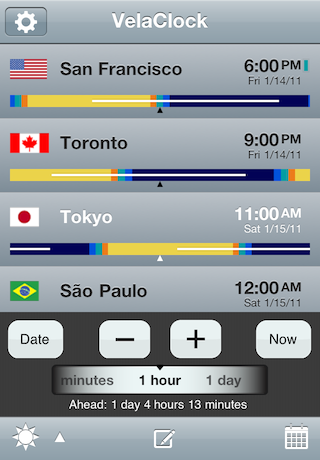
Places list
The rows in the city list can show a daylight bar that gives the user a picture of 24 hours of natural light (bright daylight, three kinds of twilight and night). The daylight bar may be centered at noon or current time. A thin white bar indicates when the moon is visible.
Change Time and Date Quickly change the time and date by incrementing or decrementing different time units (e.g. hours, minutes, days, weeks, etc.). Jump to any arbitrary date/time by tapping on the Date button.
Toolbar Icon Actions
|
|
|
|
|
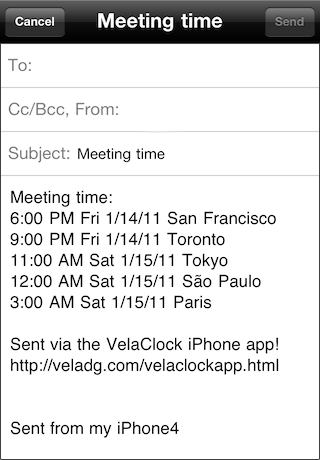
Send Meeting Time Email
After finding a good meeting time for several cities, an email can be sent to announce the meeting time with the local time and date listed for each city.
|
|
|
|
|
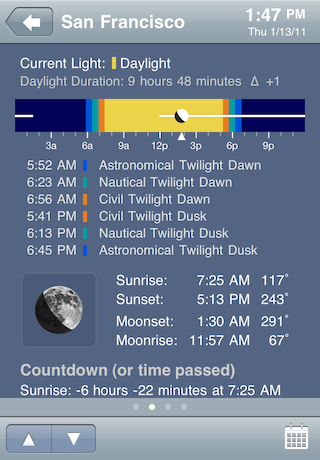
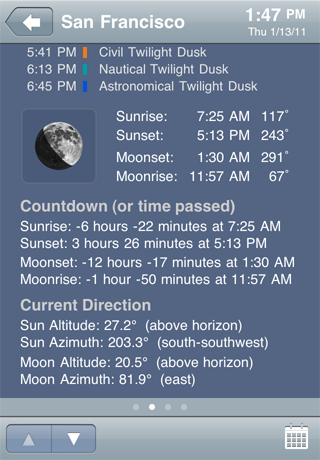
Sun/Moon detail panel - part 1
The upper part of this detail panel shows:
There are three kinds of twilight: civil, nautical and astronomical. For twilight definitions, visit: http://en.wikipedia.org/wiki/Twilight
|
|
|
|
|
Sun/Moon detail panel - part 2
The lower part of this detail panel shows:
|
|
|
|
|
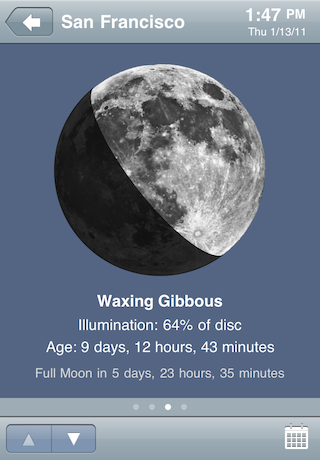
Moon detail panel
This detail panel shows:
|
|
|
|
|
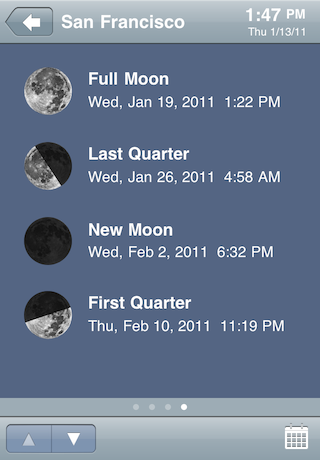
Next Phases detail panel
This detail panel shows the dates, times and images of the next four moon phases.
|
|
|
|
|
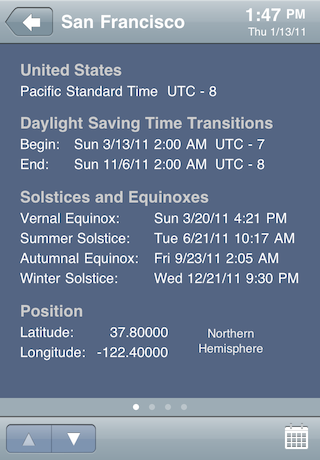
General Info detail panel
This detail panel shows:
|
|
|
|

|
Daylight Bar Color Themes
Two Daylight Bar Color Themes are available, Natural colors or Blue colors. Some users may find the Blue color theme, pictured to the left, to be more soothing and restful than the Natural colors.
The daylight bar color theme can be changed under the Settings tab by tapping on the Gear icon above the City list.
|
|
|
|
|
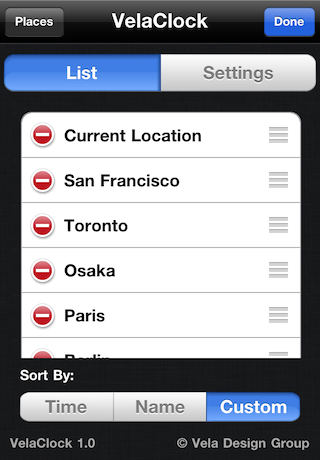
Places List
Add a new place by tapping on the Places button (located at the top left corner of the screen). Up to 50 cities may be added to the list.
- Remove places (by tapping on the red button to the left of the city name). - Sort places by time, name or a specify a custom order.
|
|
|
|
|
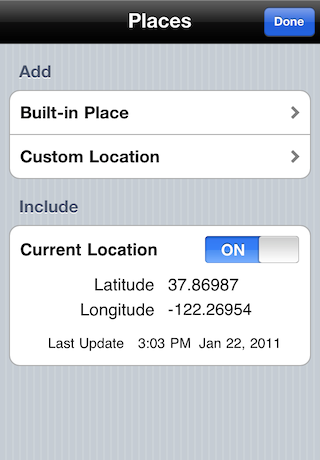
Add Places Built-in and custom locations can be added. There are over 500 built-in cities. Custom locations may be defined and added.
Current Location Turn the "Current Location" switch ON to add it to your list of Places. The position of this location is re-calculated every few minutes. If network access or GPS is not avalable, the last current location will be used. This feature is compatible with iPhone 4/3GS/3G, the original iPhone, and iPod touch.
|
|
|
|
|
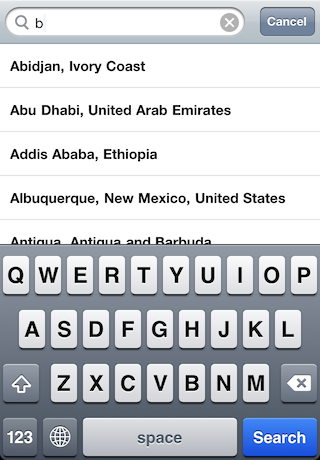
Search for Built-in Places
Type a name to find a city.
|
|
|
|
|
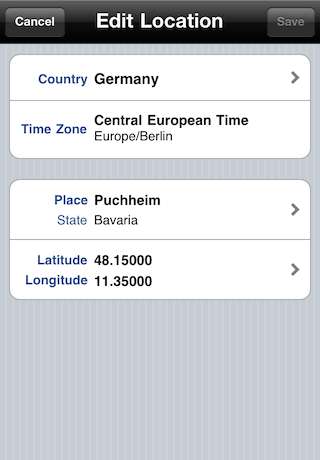
Custom Location
Add your own locations by specifying country, time zone, city name and latitude/longitude. The Custom Locations feature is designed for locations that are not included in the built-in list of cities. |
|
|
|
|
Reviews
VelaClock 1.0 was featured as TUAW's Daily App on March 11, 2011! Reviewer Mike Schramm said, "take a look at the interface on this thing -- it's been thought through so well that just that first page, with the bars and flags, is packed with more information than you'd ever need to know at any one time. Not only do you get the date and time, but you also get day length, countdown to sunrise and sunset and even the timing for dusk and dawn for all of those locations, all relayed in a visually simple and intuitive way. Pretty impressive." TUAW.com review: http://www.tuaw.com/2011/03/11/tuaws-daily-app-velaclock/
|
||
|
App Store Reviews
Fun and useful app
★★★★★ "I have had VelaClock (now called VelaClock 1) since before the name was changed to MagicHour and then back to the original name--in other words, for years by now. It has been a great app for checking on daylight hours, moon phases, moon visibility, etc, and it would be a very good app if that were all it does. However, you can easily keep track of a bunch of locations all over the globe, and you can check out those data for any time or date. We regularly check months in advance to see what the daylight hours will be during our annual August trip to Vancouver, and enjoy the contrast with our paltry hours of daylight where we are. Or we check to see how soon the sun will begin to return to early morning and late afternoon in January. The shades of twilight are also very useful for planning evening activities. It's been a real favorite for me. Apparently the complainers--who tend to be the most vociferous "reviewers"--griped when that app changed to this interface, despite some extra goodies, so the developer reverted to the original interface in that app and produced this one with the new interface. I like the app well enough to spend a buck in the expectation that this will retain the benefits introduced with that earlier update, such as nicer graphics and dates of daylight savings times and a few other features. It's well worth a buck to me to get this version, even though I, in effect, already had it, so i can enjoy the (anticipated) updates."
Outstanding app and update
★★★★★ "Like a previous reviewer, I have had this app's predecessor (which is now called VelaClock1) since it was originally introduced and through all of it's various name changes. It is my favorite app though, admittedly, I don't use it every day. This version is a major interface change (I would say upgrade), which allows for an increased amount of information to be presented through the use of multiple screen pages for each city. The type is also larger and easier to read. I find the interface very intuitive and easy to navigate. Those who desire everything on a single screen and don't mind less data and smaller type will want to use VelaClock1. As for me, I am grateful for the time, effort, and thought that the developer devoted to this version -- VelaClock Sun/Moon. As you can see from the screen shots above, the large photo images of the moon in its various phases are to die for. An example of the casual user's use for this app is that I was curious whether I would be graced with a full moon six months from now when I will be attending an evening Polynesian Luau dinner show at Disney World. (Answer: The moon won't rise till the show is over and will be a waning crescent.) I did find that when cities are sorted by time then the cities that share a given time zone are listed in alphabetical order. I find this disorienting and feel that they should be listed by longitude, as this more closely approximates their relative time (harking back to pre standardized time zone days). This is not nearly enough of an issue to knock off a star from the ratings. I simply use the "custom" sort to list the cities in the order I like them. I highly recommend this app! Many thanks to Vela Design Group."
Excellent
★★★★★ "Does it's job, works great. Nice clean look."
|
||
|
|
||
|
Vela Design Group's first world clock with a compact and highly user configurable interface was the VelaClock dashboard widget, released on April 29, 2005 when Mac OS X 10.4 was introduced. After more than five years on the market, the VelaClock widget continues to appear frequently in Apple's Top 50 widgets list and has users in over 80 countries.
|
||
|
|

|
|
VelaClock works with iPhone and iPod touch. Requires iOS 4.0 or newer.
VelaClock does not require a network connection. |